The full Nova platform

Everything inside the Nova learning platform.

Explore every part of the platform — live masterclasses, homework, the exam engine, command centres, assessment tools and smart revision — all in one place.

⚡ See the platform in motion

One connected ecosystem.

Every module feeds into the next. Student completes homework → teacher sees progress → intervention fires automatically.

🎯Live

Teacher Command Centre

3 urgent actions
12 to mark
4 at risk
📚Active

Homework Hub

86% complete
2 help requests
Auto-marked
📄Live

Exam Monitor

24 students live
Q3 avg progress
2 flagged
✍️Marking

Mark Desk

8 scripts left
Annotations active
Feedback ready
🎓Active

Student Dashboard

840 XP today
7 day streak
1 overdue task
⚙️System

Admin Command

5 schools active
3 modules on
Analytics updated
Student actionTeacher seesAuto interventionRecovery actionProgress updates
🎓 Live & On-Demand Learning

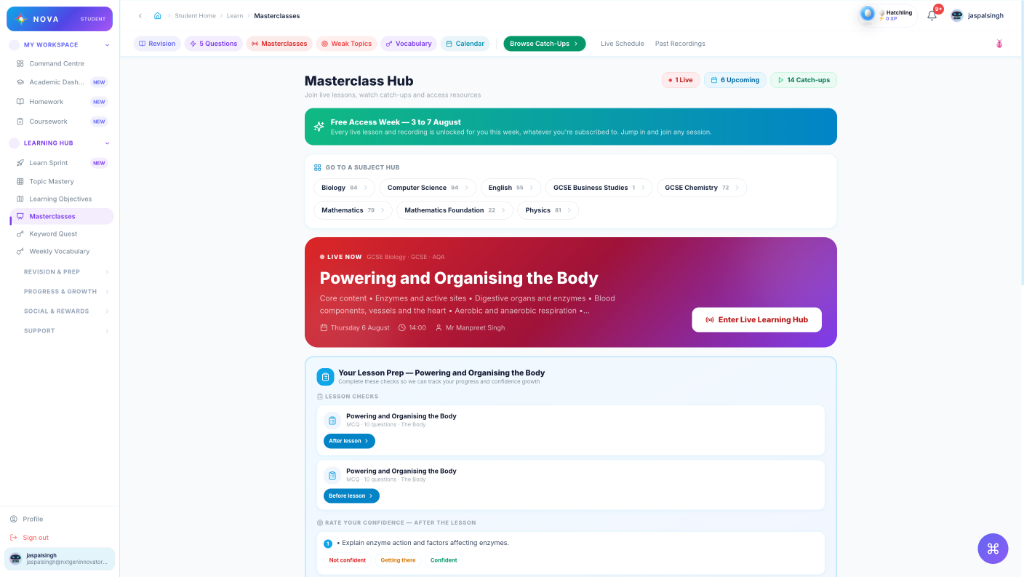
Live and catch-up masterclasses
built into the platform.

Schedule live sessions, publish recordings with note checkpoints, and track every student's engagement against your specification.

masterclass hub
Masterclass Hub loading...

Everything teachers and students need for masterclasses.

🔴

Schedule live sessions

Link Google Meet, tag by subject and objective, set reminders.

📼

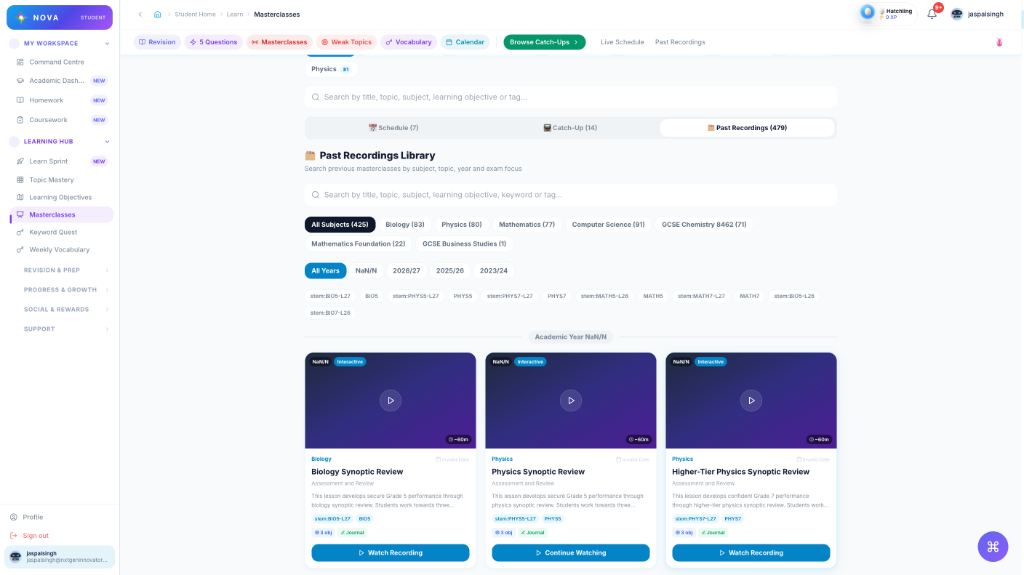
Recorded catch-ups

Students watch on demand. Note checkpoints pause and prompt reflection.

Active note checkpoints

Timed prompts keep students engaged. Notes save automatically.

📊

Engagement analytics

Attendance, views, checkpoint completion and follow-up actions.

🎯

Objective-mapped sessions

Every masterclass is linked to course topics and specification points.

🔔

Teacher analytics

See who hasn't watched, who needs a follow-up, and checkpoint scores.

📚 Homework Hub

Homework that creates, tracks
and supports learning.

Build multi-block homework with MCQs, keywords, written responses and automated feedback. Track every submission, help request and intervention.

1

Teacher selects subject and objectives

Computer Science, OCR GCSE — topic objectives load automatically from the specification.

2

Drag blocks into the homework canvas

MCQ bank, keyword builder, written response and file upload blocks.

3

Assign to one class or many

Set different due dates per class. Assign to selected students for intervention.

4

Students complete and ask for help

Communication Hub links directly from the homework task.

5

Completion and marks sync to Assessment Centre

Auto-marked MCQs feed into the markbook. Below-target students flagged instantly.

homework studio
Subject:OCR GCSE Computer Science
Teacher selects subject & class
📄 Exam Paper Engine

From paper builder to
live exam monitoring.

Import, build, release and monitor exam papers. Every question answered is tracked in real-time. Mark, publish and send feedback in one flow.

exam paper engine

GCSE CS Paper 1

Draft

Complete exam workflow in one place.

📁

Paper library

Global, school and teacher-created papers. CSV and Word import.

🔨

Paper builder

Flexible numbering, mark schemes, model answers, command words.

🚀

Release wizard

Select classes, set mode, duration, timing and student tools.

👀

Live monitoring

Watch progress question by question. Message students in exam.

✍️

Mark Desk

Annotation tools, mark scheme side-by-side, instant feedback.

🔁

Second attempts

Release recovery, allow resubmission, or set new exam mode.

🎯 Teacher Command Centre

A daily command centre
for teachers.

See today's priorities instantly. Know which students need support. Act in one click without digging through data.

teacher command centre

Every signal a teacher needs, in one place.

Teachers shouldn't have to dig through gradebooks, homework trackers and message inboxes separately. The Teacher Command Centre surfaces what matters, right now.

Today's priority stack

Marking queue, help requests, overdue homework and at-risk students.

🏥

Class health overview

Average performance, topic weaknesses and student-level RAG status.

🎯

Next Best Action engine

AI-powered recommendations: mark, message, assign recovery or run a sprint.

💬

Quick actions

Message class, assign homework, release exam paper or create sprint from one button.

📊

Assessment Centre link

Drill into any student's assessment journey from the command centre.

🎓 Student Command Centre

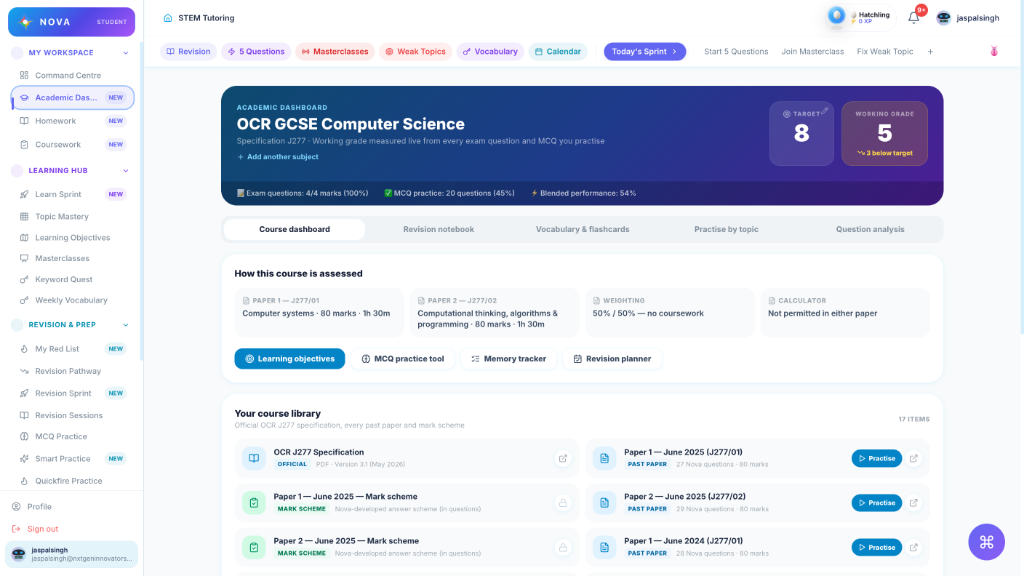
A personalised revision path
students want to follow.

Students know exactly what to do next. XP rewards, monster companions and daily streaks make independent study feel rewarding.

student dashboard
🐉

Lv.12 Dragon

XP Progress840
7 day streak 🔥

Students know exactly what to do next.

No confusion about what to revise. The Student Command Centre builds a personalised daily path — driven by actual performance data.

🏃

Today's sprint

Daily task list based on weak topics, due homework and upcoming exams.

⚠️

Weak topic alerts

RAG status turns red when performance drops below target.

🐉

Monster XP companion

Students earn XP, level up their monster and unlock badges for consistency.

🔥

Daily streaks

Momentum builds with daily practice. Streaks keep students coming back.

🎯

Next Best Action

After every task, students see exactly what to do next to improve.

Live Exam Monitor

Watch every student
through the exam in real-time.

See which question every student is on, how much time they've spent, and who's falling behind. Message students directly during the exam.

GCSE CS Paper 1 · LIVE
34:22 remaining

Everything teachers need during a live exam.

No more walking round the room trying to see who's on which question. The Live Monitor gives a teacher the full picture at a glance.

👁️

Real-time question tracking

See which question every student is on, updated live as they progress.

⏱️

Time and pace indicators

Percentage progress and estimated pace alerts for slow or fast students.

🚩

Student flag alerts

Students can flag a question they're unsure about — teacher sees it instantly.

💬

Message during exam

Send a private message to a student without disrupting the room.

⏸️

Pause and extend time

Pause the exam for all students or grant individual extra time.

📊

Post-exam analytics

Question-by-question performance data available immediately after submission.

✍️ Mark Desk

Examiner-style marking
with faster feedback.

Mark answers with annotation tools alongside the mark scheme. Publish feedback instantly. Marks sync to Assessment Centre automatically.

mark desk

Student Answer

Q2(b) — 4 marks

"The CPU uses the fetch-decode-execute cycle to process instructions. The ALU performs arithmetic and logical operations..."

Mark with the precision of an examiner.

The Mark Desk puts the student's answer and the mark scheme side-by-side. Annotation tools, dynamic marks and instant feedback — all in one interface.

📋

Side-by-side mark scheme

Tick, cross and BOD annotations applied directly to the answer.

🏷️

Examiner annotation stamps

BOD, ECF, NAQ, Vague, Missing — all standard examiner marks.

💬

Instant written feedback

Type feedback once. Publish to all students with one click.

📊

Assessment Centre sync

Marks flow automatically into the class marksheet and student journeys.

🔁

Mark by student or question

Work through one student's full paper or all students' Q3 answers.

📊 Assessment Centre

Every mark becomes
an intervention signal.

Homework marks, quiz results and exam papers all feed into one class marksheet. Below-target students are flagged automatically with suggested recovery actions.

assessment centre

Student

Score

Target

Status

Arjun S.

68%

Maya P.

68%

The marksheet that thinks for you.

No more spreadsheets. Every piece of assessed work — homework, quizzes, exam papers — feeds automatically into the class marksheet with target comparison built in.

📋

Class marksheet

One view for all marks — homework, quiz, exam, formal assessment.

🎯

Target grade comparison

Every student's result compared against their target automatically.

🚨

Instant below-target alerts

Red flags appear the moment a student underperforms.

🔗

Linked learning objectives

See which topics caused the poor performance — not just the score.

🔁

One-click recovery

Assign a targeted recovery homework or sprint from the marksheet row.

📈

Student journey view

See every assessment a student has completed and their improvement over time.

💬 Communication Hub

Support linked to the work
students are doing.

Students ask for help directly from homework tasks and exam papers. Teachers receive prioritised alerts. Every conversation is threaded and linked to the work.

communication hub

Student → Teacher

A

Aisha M. · Homework: Binary Conversion

Hi, I'm stuck on Q3 — I don't understand how to convert negative numbers using two's complement. Can you help?

Help request2 min ago

Messaging that stays in context.

Every help request links back to the homework task, exam question or revision sprint. Teachers see exactly what the student is working on — no context needed.

🔗

Contextual help requests

Students ask for help directly from the task. Teachers see what question, what topic, what homework.

Priority queue for teachers

Help requests surface as urgent priorities on the Teacher Command Centre.

📢

Class announcements

Send messages to an entire class or selected students in one click.

Student acknowledgements

Students confirm they've read and understood. Thread status updates automatically.

📎

File attachments

Share photos, PDFs or working. Students can upload evidence of understanding.

🔔

Unread badge tracking

Students and teachers both see clear unread counts and notification pop-ups.

⚙️ Platform Command Centre

A control centre for schools,
content and modules.

Manage every school, subject, qualification and module from one admin interface. Full audit log, import centre and analytics dashboard included.

platform command centre

5

Schools

13

Subjects

2,832

MCQs

Admin power without the complexity.

The Platform Command Centre gives admins full control — from onboarding a new school to managing MCQ content, enabling modules and reviewing usage analytics.

🏫

School management

Add schools, set contacts, configure settings and control module access per school.

📐

Subject setup wizard

Add qualifications, map topics, load learning objectives and import MCQs.

📦

Import centre

Bulk import MCQs, objectives, keywords and exam questions via CSV.

🔧

Module access control

Enable or disable Homework Hub, Exam Engine, Masterclasses and Sprints per school.

📊

Platform analytics

Usage heatmaps, engagement data and module performance across all schools.

📝

Full audit log

Every admin action, content change and school update is logged and traceable.

Built-in Motivation

Students are guided through revision
with XP, streaks and progress.

Daily actions, XP rewards and monster companions make independent study feel more achievable and rewarding.

XP Rewards

Earn XP for completing tasks, building streaks and mastering topics.

Daily Streaks

Build momentum with daily practice. Keep the streak alive!

Badges & Achievements

Unlock badges for milestones, mastery and consistency.

Level Progression

Level up your monster companion as you progress through topics.

🎯
+50 XP
Level 121,240 / 1,300 XP

7

Day Streak

24

Tasks Done

+12%

This Week

🧠 MCQ · Revision Sprints · Learning Sprints

Practice that adapts
to what students know.

MCQ practice, revision sprints and learning sprints combine to give students a guided daily practice engine. Every question updates their topic mastery profile.

revision practice
Binary ArithmeticQ4 of 10

What is the denary value of 11001100 in binary?

A. 196
B. 204
C. 216
D. 188

Three practice modes. One mastery engine.

MCQ practice, revision sprints and learning sprints each serve a different purpose — but all feed the same mastery profile that tells students what to do next.

🧠

MCQ Practice

Exam-style multiple choice with instant feedback, explanation and topic tagging.

🏃

Revision Sprints

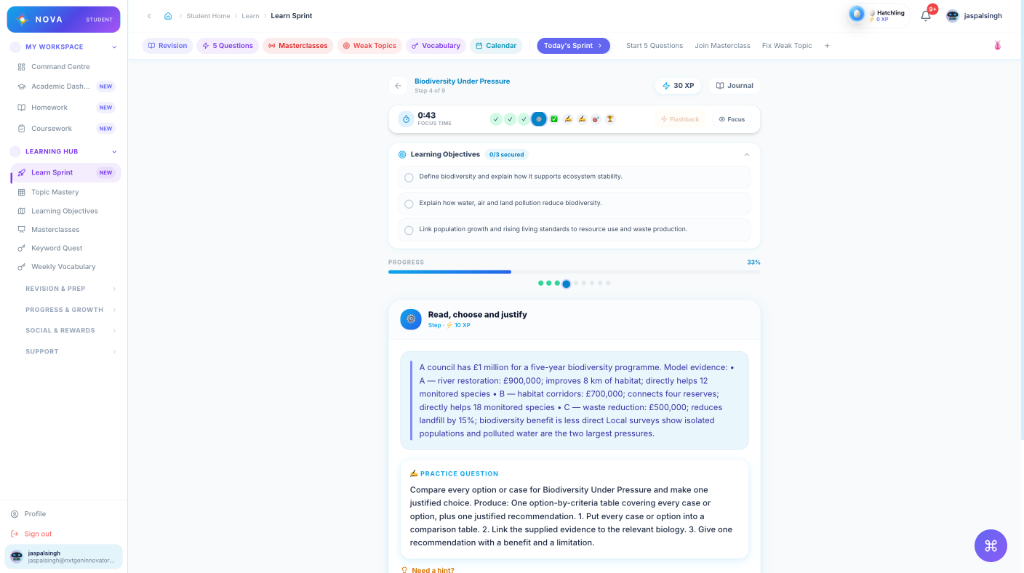
Daily 5-10 question practice sets targeting weak topics. XP and streaks included.

📖

Learning Sprints

Guided mini-lessons combining keywords, MCQs and written tasks around one objective.

🗺️

Topic mastery map

RAG status per topic updates in real-time. Red to amber to green as students improve.

XP and streaks

Every correct answer and completed sprint earns XP. Streaks build daily momentum.

🎯

Next question suggested

After each response, the engine picks the next most important question to practice.

🗺️ Platform journeys

Follow the flow.

See how teachers, students and admins move through the platform — and how every action connects to the next.

The Teacher Workflow

From lesson planning to recovery — in one connected flow.

🎯

Teacher Command Centre

Start the day with today's priorities, marking queue and help requests.

📚

Create Homework

Build a homework with MCQs, keywords and written response blocks.

📄

Release Exam Paper

Set up a live exam with class selection, duration and student tools.

👁️

Live Monitor

Watch students progress question by question in real time.

✍️

Mark Desk

Annotate answers, apply marks and publish feedback.

🔁

Assign Recovery

Below-target students get a targeted recovery sprint automatically.

The Student Journey

A personalised path that builds confidence every day.

🏠

Student Dashboard

Students see exactly what to do today — homework, practice and exams.

📝

Complete Homework

Multi-block homework with MCQs, keywords and written tasks.

📄

Sit Exam Paper

Timed, question-by-question exam workspace with flag and save.

💬

Ask for Help

Message teacher directly from the homework task.

Review Feedback

Receive marks, annotations and voice notes from the teacher.

🐉

Earn XP & Level Up

Completion earns XP, builds streaks and advances the monster companion.

The Exam Lifecycle

From blank paper to published results in one system.

📁

Import or Build Paper

Import via CSV or Word, or build from scratch in the paper builder.

👁️

Preview Paper

See the paper exactly as students will see it before releasing.

🚀

Release to Classes

Set mode, duration, due date and student tool permissions.

🧑‍💻

Students Complete

Question by question. Save and exit. Flag for review.

📊

Live Monitor

Progress updates in real time. Message students as needed.

Mark & Publish

Annotations, marks and feedback published to students and Assessment Centre.

Platform Setup

From admin setup to live teaching in under an hour.

⚙️

Platform Command Centre

Open the admin dashboard. Schools, subjects, modules all visible.

Add Subject

Use the setup wizard to add a qualification, exam board and course.

📐

Load Objectives & MCQs

Import learning objectives and map MCQs to topics.

🏫

Assign to School

Attach the subject to one or more schools.

🔧

Enable Modules

Turn on Homework Hub, Exam Engine and Masterclasses for that school.

📊

Review Usage

Analytics dashboard shows engagement, module usage and student activity.

See the platform in action.

Sign up for a subject, or get in touch to bring Nova to your school.